Evaradh Book a demo

Evolution by Radhika

Evaradh

We find a problem people already live with, build a product, and take it to them.

We question.

Our first product, Eve Compass, runs a school's attendance, homework, notices, fees and parent updates in one app.

Book a free demo See Eve Compass

  • What A technology product company
  • Who Radhika Daithankar
  • Where Pune

01  /  First product

A school, connected.

The first product under this name is for schools. Not because Evaradh is a school company. Because this was the problem in front of us.

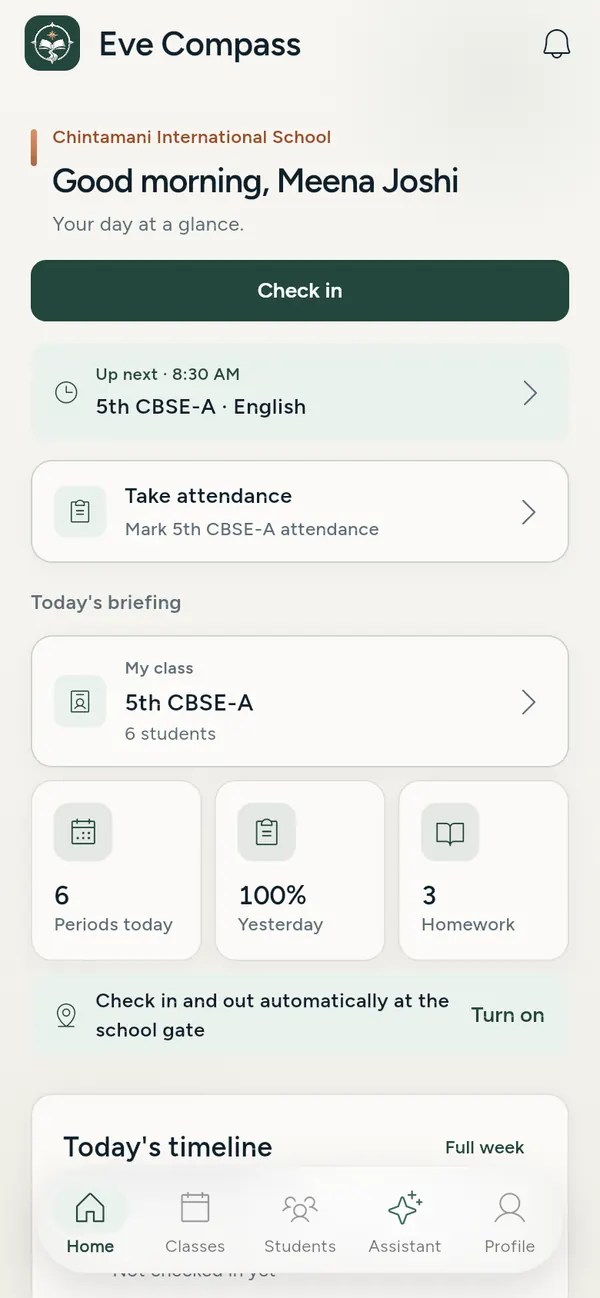
Eve Compass teacher app. Teacher home: check in, the next class, take attendance and today's briefing.
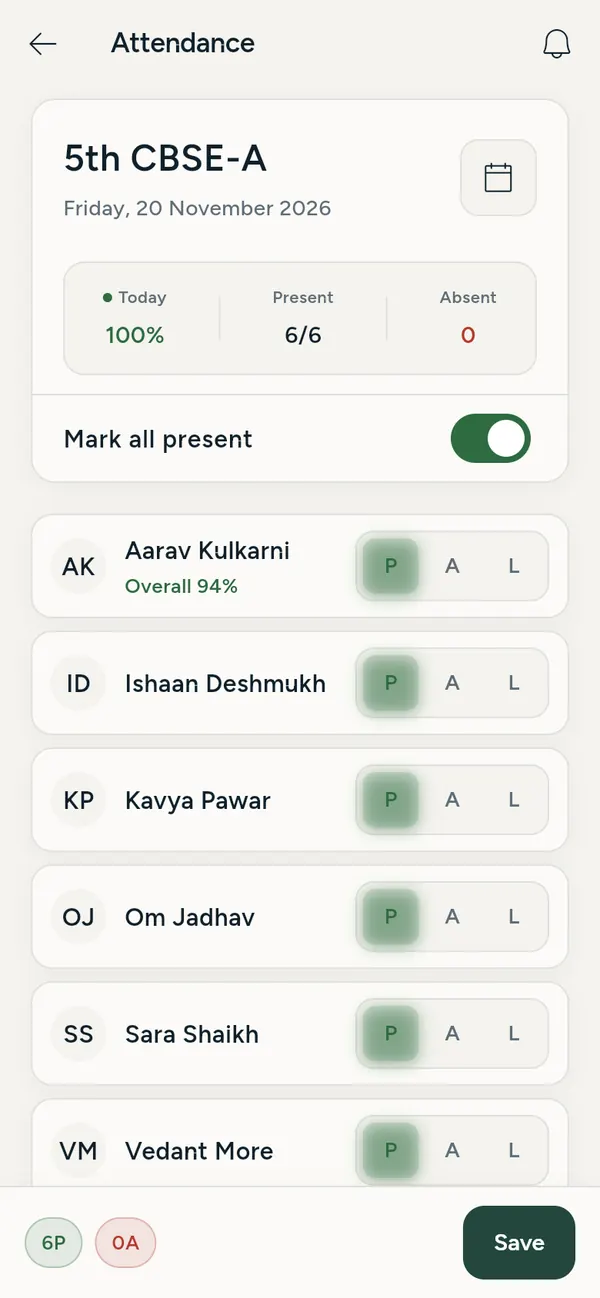
Eve Compass teacher app. Class attendance with present, absent and leave for each student.
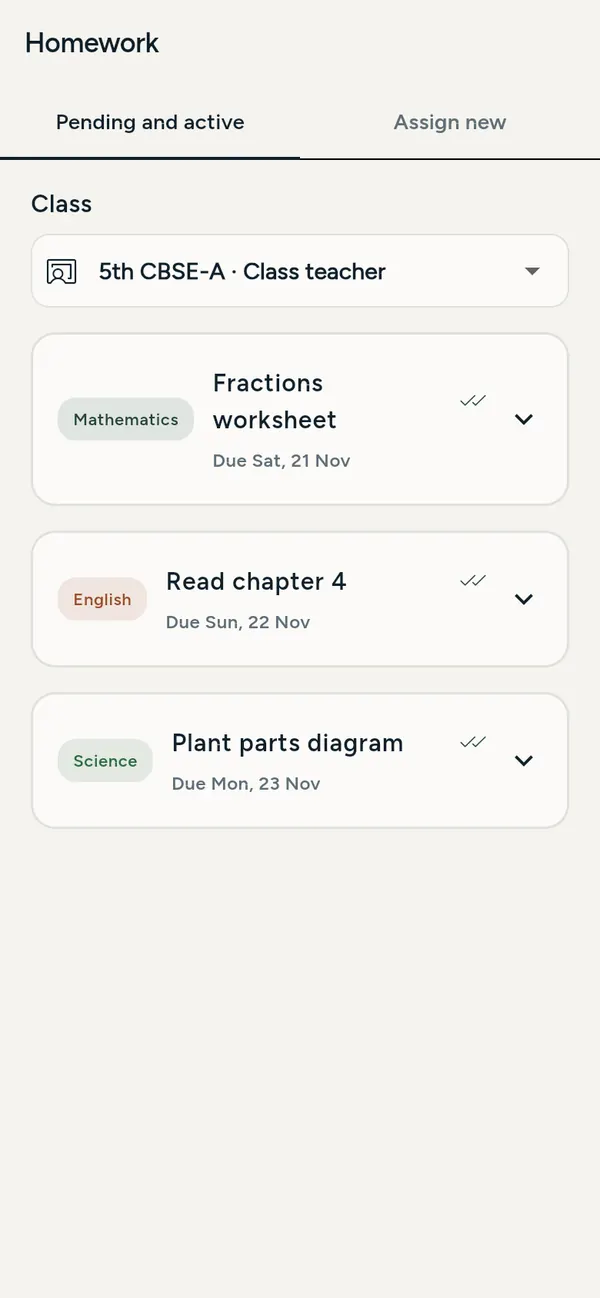
Eve Compass teacher app. Homework set for the class, by subject and due date.
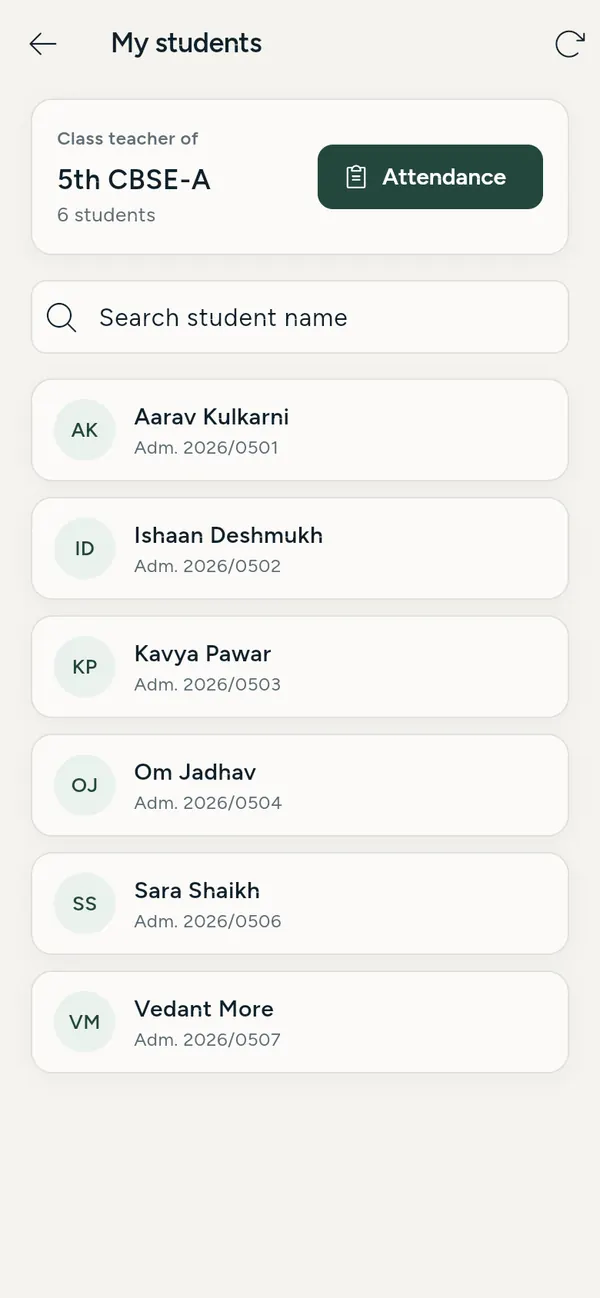
Eve Compass teacher app. The class teacher's list of students.
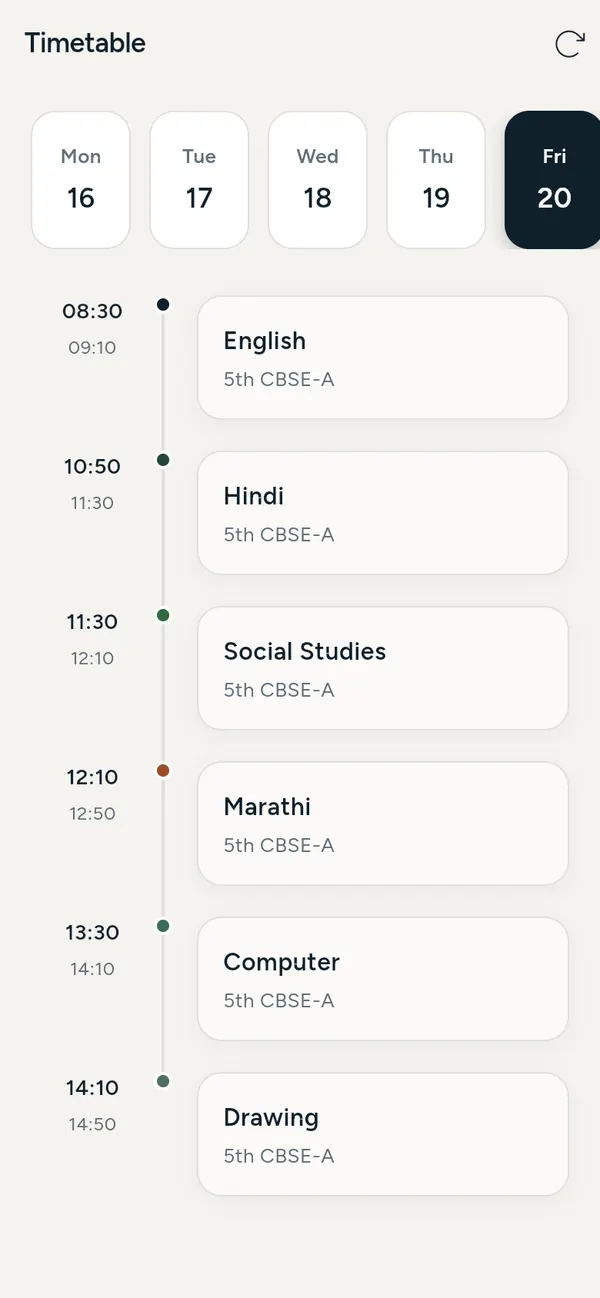
Eve Compass teacher app. The teacher's timetable for the day.
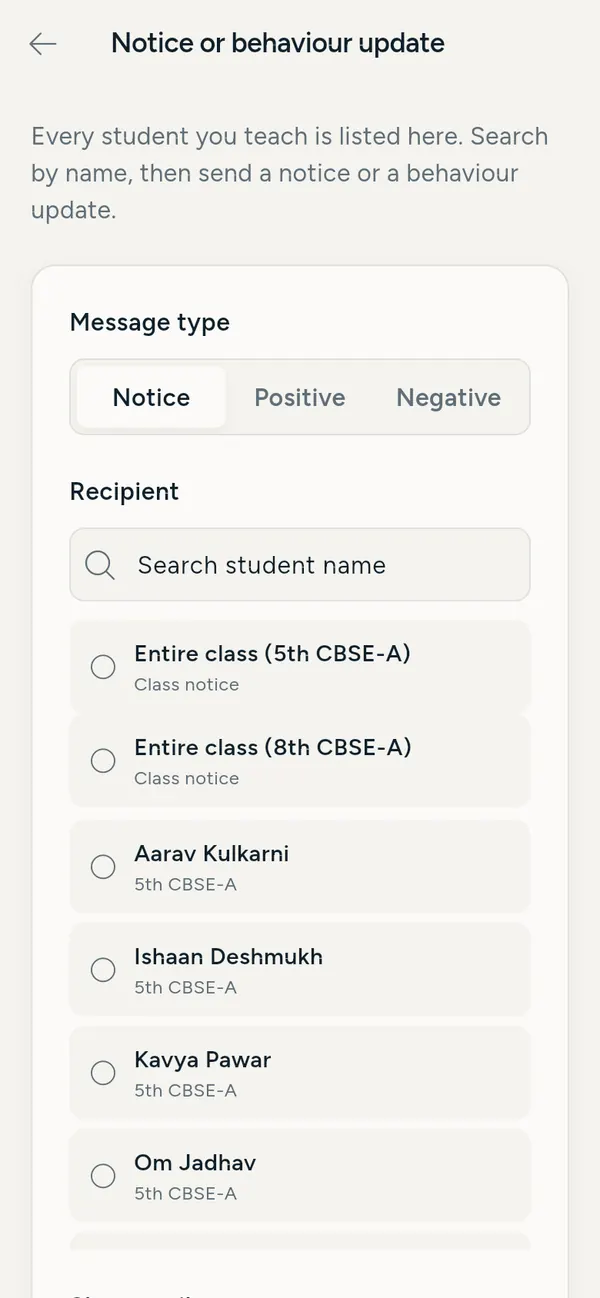
Eve Compass teacher app. Sending a notice or a behaviour update to a parent or the whole class.
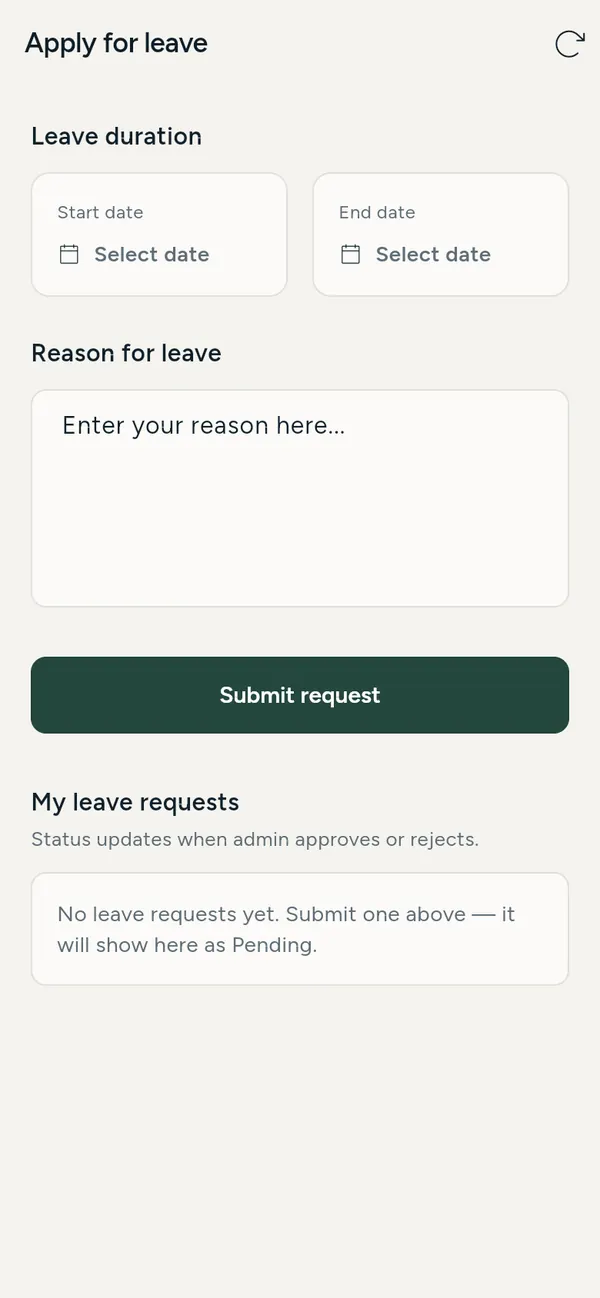
Eve Compass teacher app. Applying for leave.
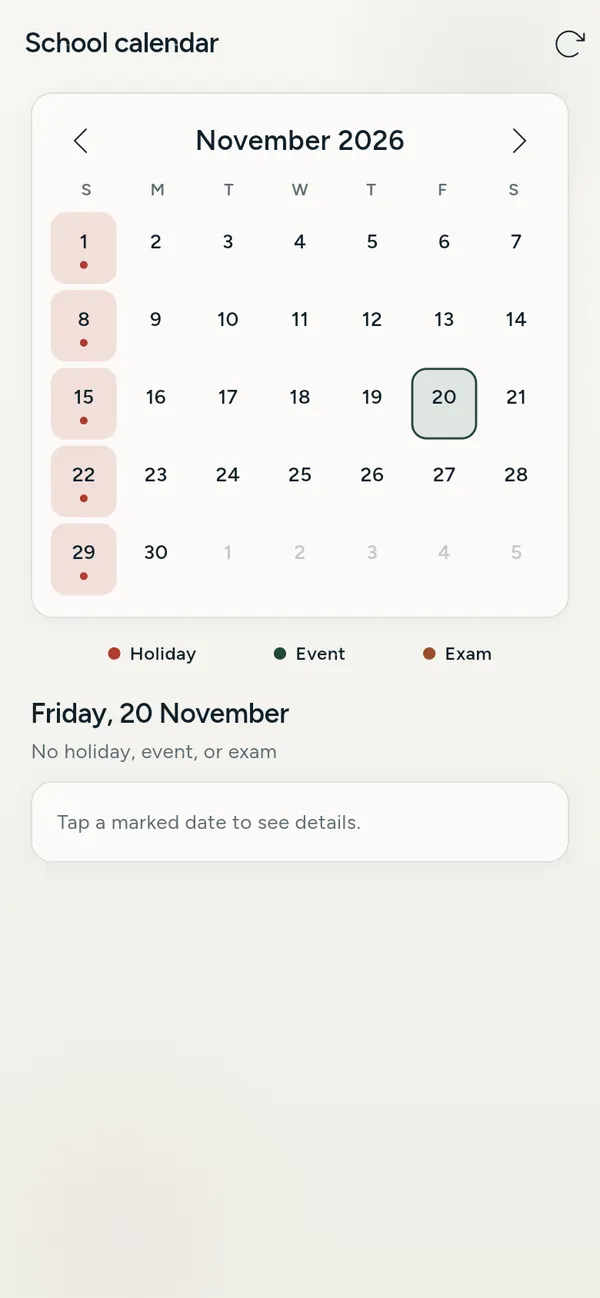
Eve Compass teacher app. The school calendar with holidays, events and exams.

Teacher 1 / 8

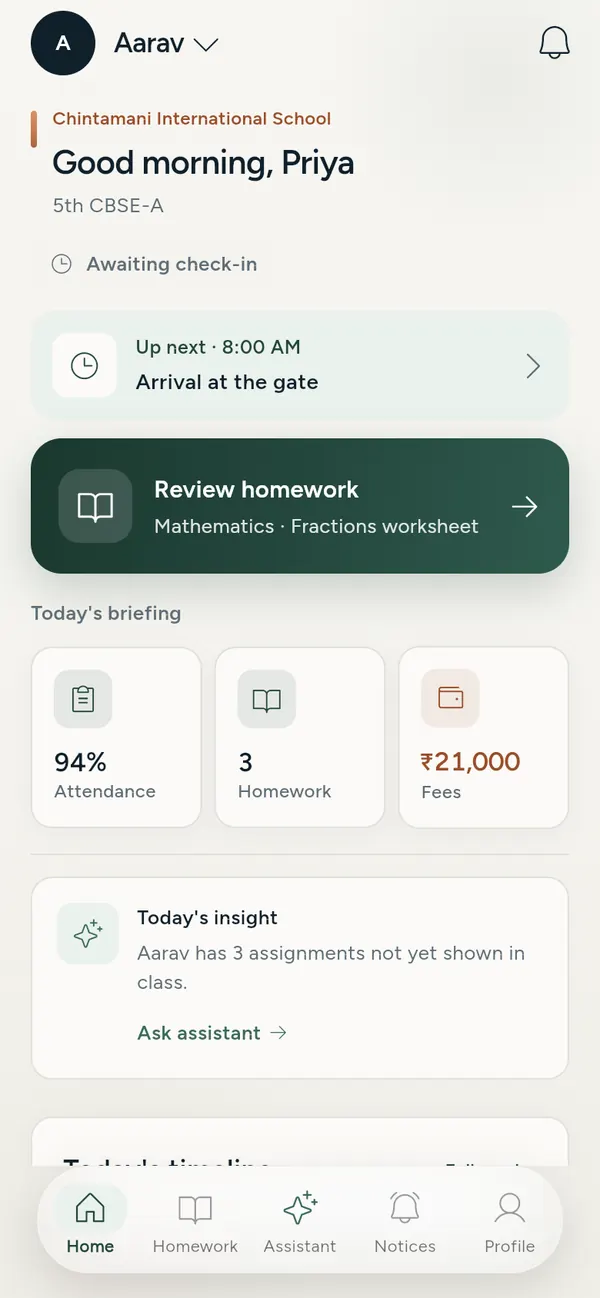
Eve Compass parent app. Parent home: today's plan, homework to review, attendance and fees.
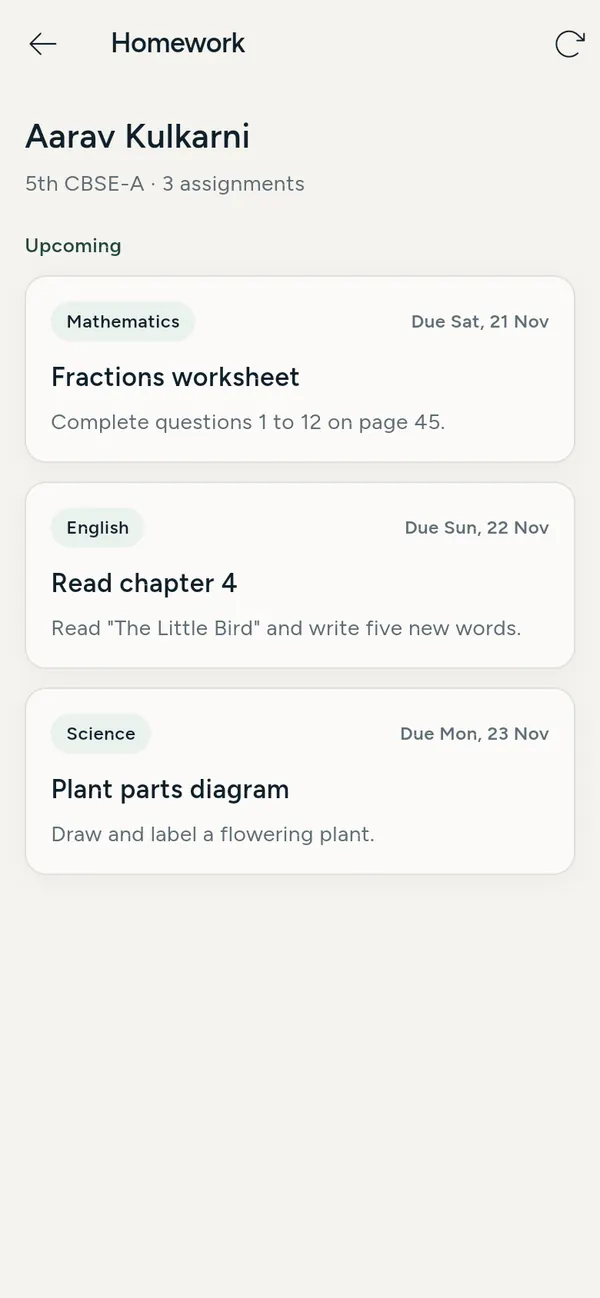
Eve Compass parent app. A child's homework, by subject and due date.
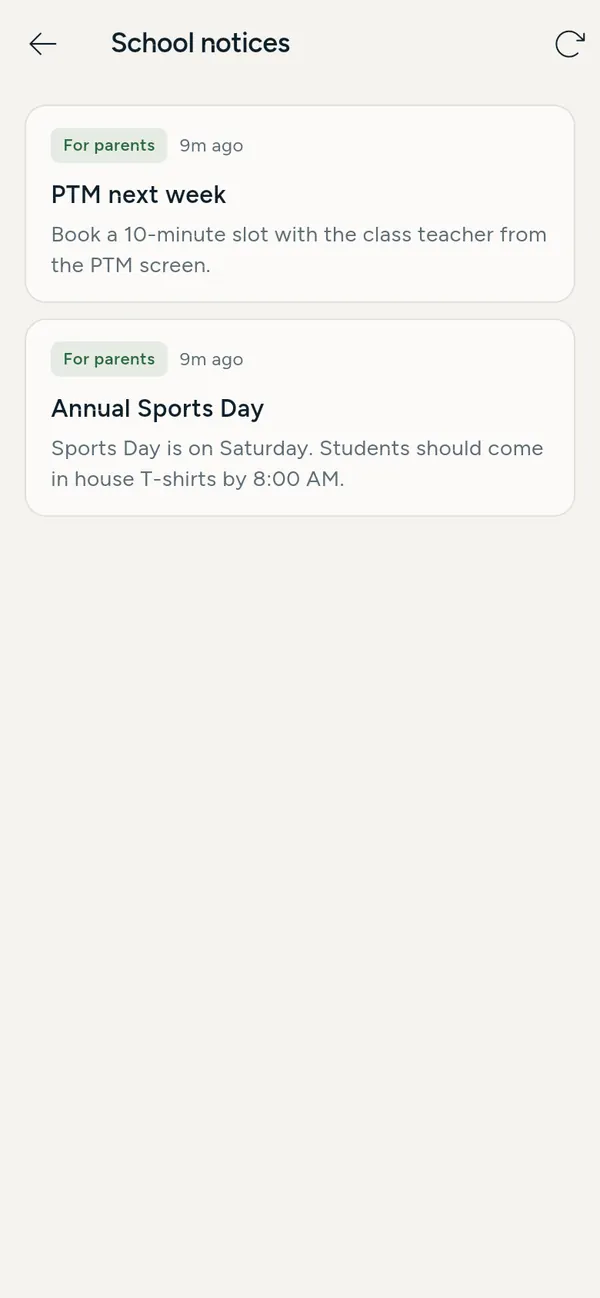
Eve Compass parent app. School notices for parents.
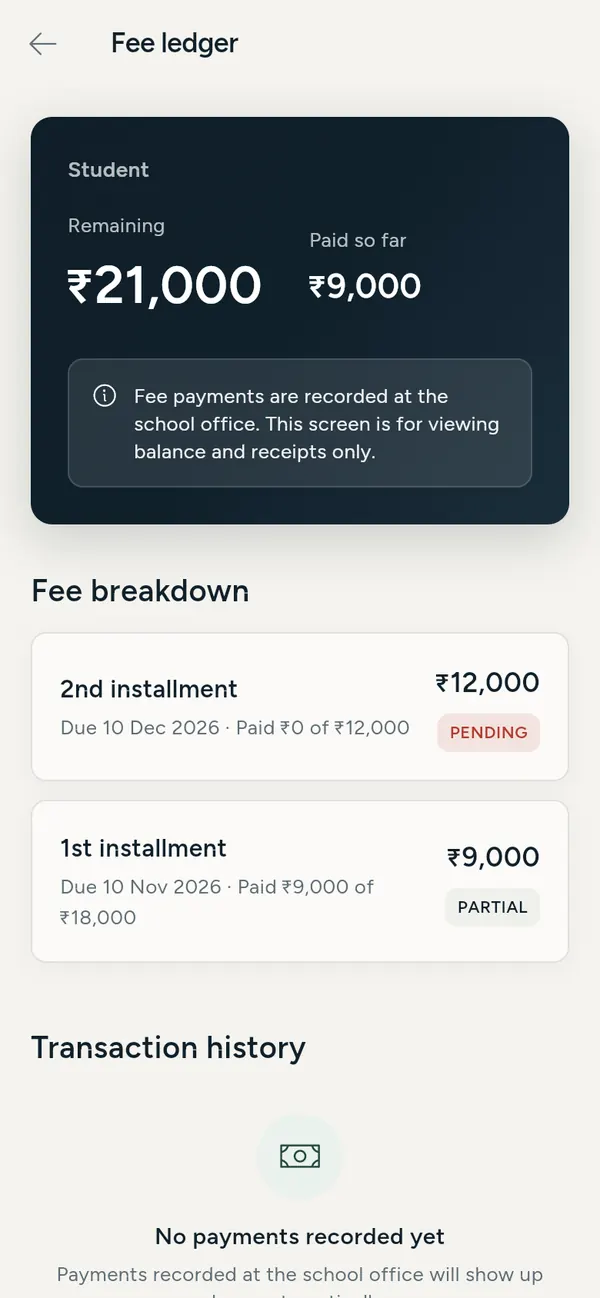
Eve Compass parent app. Fee ledger with the balance, amount paid and each installment.
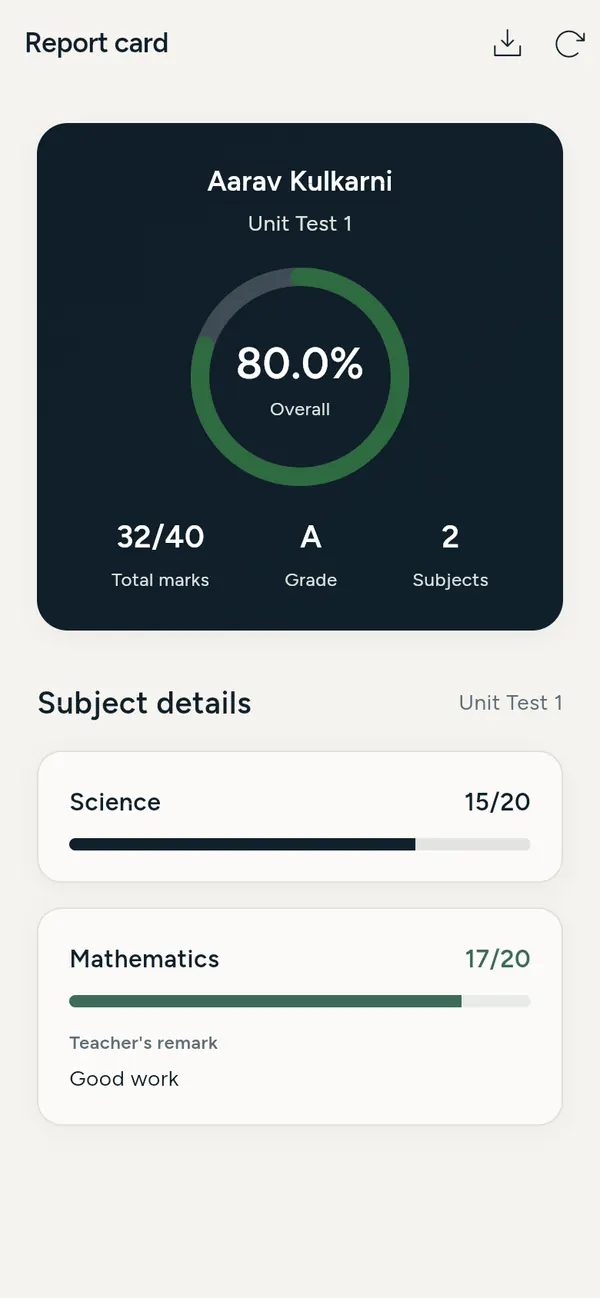
Eve Compass parent app. Report card with marks, grade and teacher's remarks.
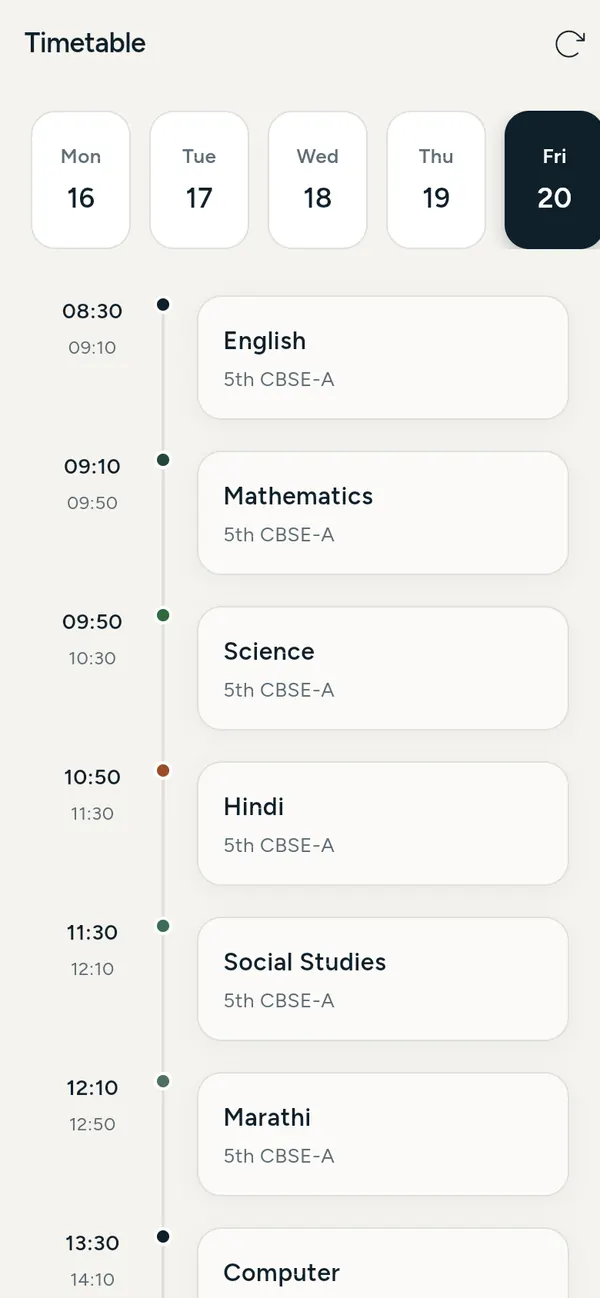
Eve Compass parent app. The child's class timetable.
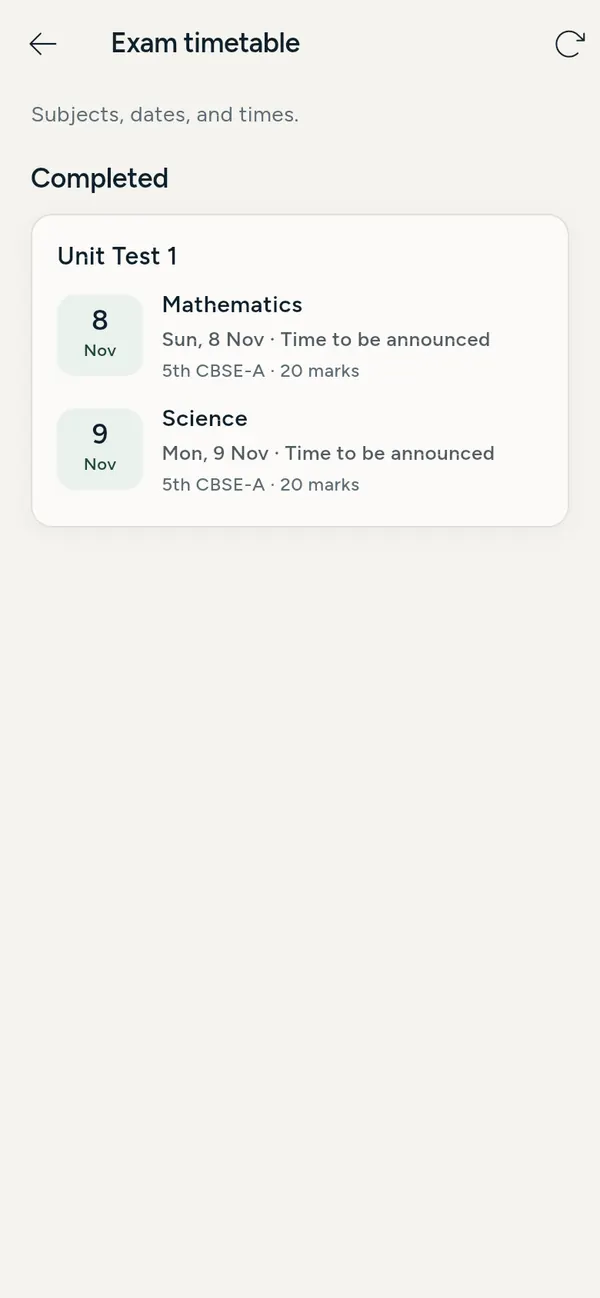
Eve Compass parent app. Exam timetable.
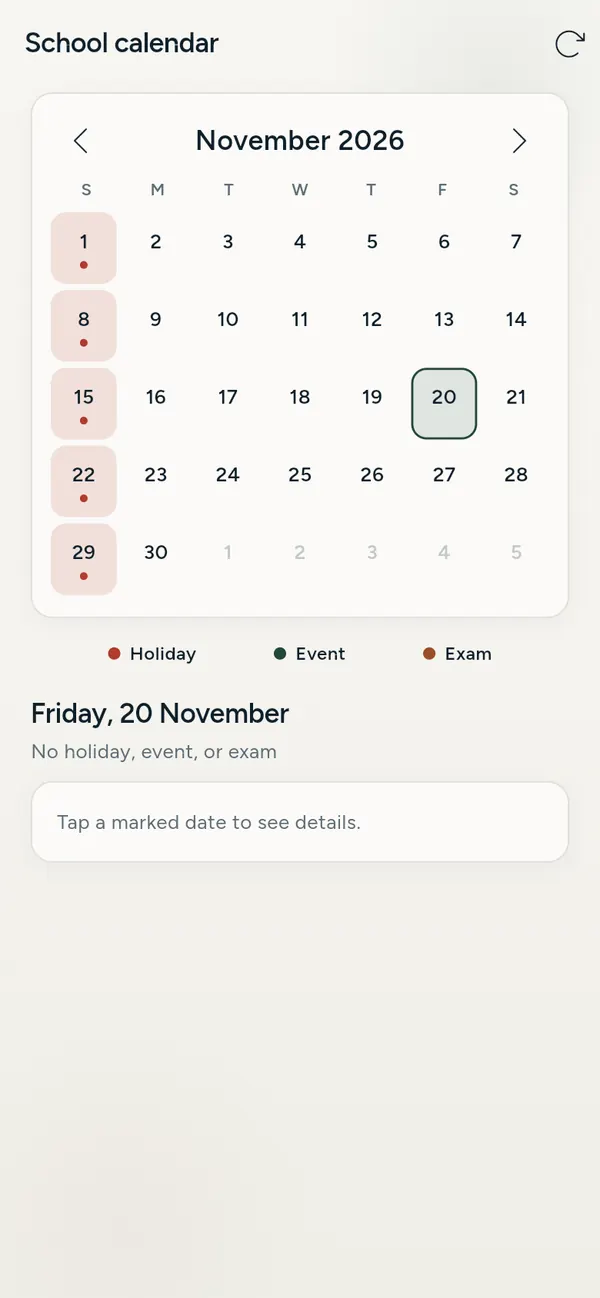
Eve Compass parent app. The school calendar with holidays, events and exams.

Parent 1 / 8

01 / Schools

Eve Compass

The life of a school was sitting in WhatsApp groups, notebooks, and office files. Parents asked. Teachers repeated. The office typed the same thing twice.

Eve Compass puts teachers, parents, and administration on one system. Teachers take attendance in class. Parents see it that morning. Homework, notices, fees, and the child's day sit in one loop instead of five WhatsApp groups.

  • ForSchools
  • First homeChintamani International School, Parbhani
  • NowIn use. First version. Allowed to change.

300 parents using the app

36 teachers and staff on it

See Eve Compass in just over two minutes: the principal's dashboard, attendance, homework, notices, fees, PTM booking and parent chat.
Read what the demo shows

Eve Compass by Evaradh. One app for the whole school day, for principals, office staff, teachers and parents.

No passwords to forget. Everyone signs in with their phone number and a one-time code, in English or Marathi.

Your school today, at a glance. Student attendance, staff check-in, fees collected and fees still due, updated through the day.

What needs you first. Eve Compass flags what needs attention, like a teacher who hasn’t checked in or fees still unpaid.

Every student in one place. Classes, admission numbers and parent contacts in one directory. Bring your roster in from a spreadsheet.

Staff check-in, sorted. Teachers check in at the campus gate, and check-in times are kept month by month, ready for salary.

A teacher’s day on one screen. The next class, attendance to take, homework to check, and one tap to check in.

Attendance in seconds. Everyone starts as present. Tap the few who are absent and save. Parents of absent children are told straight away.

One timetable, everywhere. Build each class timetable on the admin website. Teachers and parents see it on their phones.

Homework that reaches home. Teachers post homework to a class and parents see it straight away. The class diary shows who has shown their work.

Exams and report cards. Publish the exam timetable and enter marks. Parents see a clear report card for every test.

Notices without paper. Choose parents, staff or everyone, write the notice, and it reaches every phone in seconds.

Every rupee accounted for. Installments, payments and dues for every child. Parents see their balance on their phone, and one click sends reminders.

Meetings booked in the app. Teachers open their free slots. Parents pick a time and say what they want to discuss. No calls, no clashes.

The office sees every booking. Every slot, who booked it and what parents wrote, in one list.

Parents talk to teachers. Parents message subject teachers inside the app, and the school can read every conversation.

One school calendar. Holidays, events and exams in one calendar, shared with every teacher and parent.

Reports in one click. Download the monthly attendance register and fee dues, ready for Excel or Google Sheets.

Everything about their child. Attendance, homework, fees, timetable and school news for each child, on one home screen.

Eve Compass by Evaradh: an admin website for the office, and an Android app for teachers and parents. Trusted by Chintamani International School. Book a free demo at evaradh.com.


Want Eve Compass for your school?

We set it up for your school, teach your staff and keep it working. The demo is free.

Book a free demo The full Eve Compass page

From Chintamani International School

  • I can see what money came in and what went out, and the attendance of every student, from one screen. I no longer wait for registers to reach my office.

    Sucheta Daithankar, Principal
  • I draft question papers in the app, and send a parent a good or a bad remark about their child personally. When I need to talk to a parent, I message them directly.

    Sandeep Patki, Teacher
  • I print the question papers teachers draft, add new admissions, update fee structures and student records, and post notices, all from the app.

    Suraj Deshmukh, Staff
  • I know my child reached school, what the homework is and which fees are due, all from one app.

    Sharad Gunjkar, Parent

02  /  What we do

For people already stuck with a process that wastes their time.

  1. 01

    Find

    A problem someone already lives with. Not a brief for a new app.

  2. 02

    Build

    A product that solves it. The first version only has to exist.

  3. 03

    Take

    Put it in their hands. Sell it, install it, teach it, keep it working. A file on a laptop is not a product.

Learn from what happens. Begin again. What we ship today is allowed to change.

03  /  How we decide

Five questions. We ask them of everything, including our own work.

Habit is not a reason to leave something as it is.

  1. Most things are the way they are because nobody asked again. Habit is not a reason.

  2. Fewer steps. Fewer screens. Less to remember. Simplicity is usually hiding under something that was added later.

  3. Sometimes with AI. Sometimes with software. Sometimes with a completely different way of thinking.

  4. If someone has to fight the tool to do their job, the tool is wrong.

  5. Sometimes the answer is not a nicer version of what exists. It is a thing nobody has made yet.

The technology is the tool.

The problem is the starting point.

04  /  The meaning of evolution

Nothing has to stay the way it is because it has always been that way.

Something we build today doesn't have to be the thing we build tomorrow. We question our own assumptions, learn from what we create, change direction, and keep moving.

05  /  Start with a problem

Name something that exists today and bothers you.

Write it the way you would say it. We cross out the tool words and ask about the problem underneath. If you want to send it, the next step is a message, not a new form.

Or start from one of these

06  /  The human side

There is a person behind it.

I started Evaradh because I wanted to look at things people live with every day and ask if they could be better. Not through technology alone. Not through AI alone. Through curiosity, creativity, and a willingness to question what already exists.

I studied artificial intelligence in London. I am not building an AI company. I am building a product company that can use AI when it is the right tool, and skip it when it is not. I live in Pune. I also run a school. The first product is for that world.

Some experiments will fail. Some ideas will never become products. Some might get bigger than I expect. I want that to stay true. The name means evolution by Radhika. That is the whole idea.

Radhika

07  /  Questions

What schools ask us.

Short answers about Eve Compass. Anything else, ask us in the demo.

What is Eve Compass?

Eve Compass is a school management app built by Evaradh in Pune, India. It puts teachers, parents and the school office on one system for attendance, homework, notices, fees, parent messages, PTM booking and leave, instead of registers, spreadsheets and WhatsApp groups.

Who uses Eve Compass?

Principals, teachers, office staff and parents. Principals see fees collected, money spent and every student's attendance on one screen. Teachers take attendance, set homework, draft question papers and message parents. Office staff handle admissions, fee structures, student records and notices. Parents see attendance, homework and fees for their child.

Which schools use it today?

Eve Compass is in daily use at Chintamani International School in Parbhani, Maharashtra, where 300 parents and 36 teachers and staff use it.

Does it work on phones?

Yes. Teachers and parents use the Android app, and the school office and principal use a web dashboard on any computer. Teachers can take attendance without internet, and it syncs when they are back online.

Can parents pay fees through Eve Compass?

Yes. Parents can see their fee ledger and pay online, and the office can record cash payments, send fee reminders and raise invoices for a whole class.

How do we get Eve Compass for our school?

Book a free demo through the contact form on this page. Evaradh sets the app up for your school, trains your staff and keeps it running.

Who is behind Evaradh?

Evaradh is a technology product company founded by Radhika Daithankar in Pune. She studied artificial intelligence in London and also runs a school, which is where Eve Compass started.

08  /  Write

If you live with a problem like that, send it.

Name, email, the problem. If we can help, we will get back to you.

Want a Eve Compass demo for your school? Add your school and phone number below, and we will call you.

We only use your details to reply to you. Privacy policy